Project · 2026
Configonaut
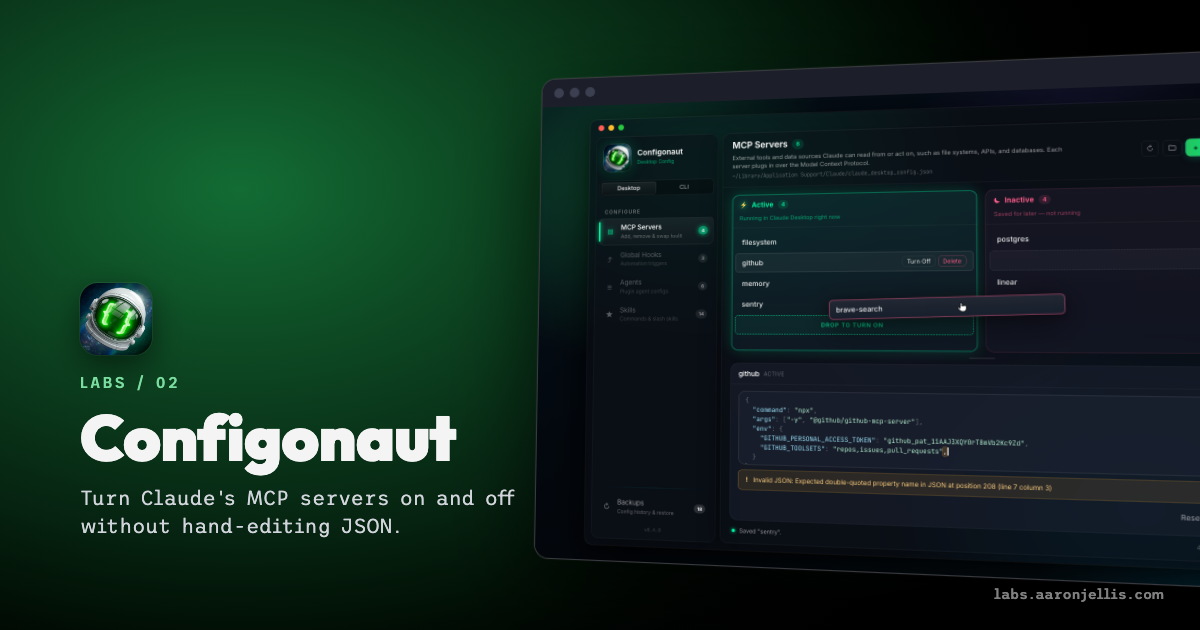
Claude, the AI assistant, plugs into outside tools through add-ons called MCP servers, each set up by hand in a text config file. I keep breaking that file and losing track of which servers are on. So I built Configonaut, a desktop app that turns the file into two columns, Active and Inactive. Drag a server across to switch it.
- Drag a server to turn it on. Bad JSON gets flagged.
- Missing Docker? It tells you before you install, not after.
- Every change snapshots first. See what changed, restore in one click.
Turning a server off doesn't delete it; Configonaut keeps its settings on the side for later. Click a server to edit its raw settings in place. The editor checks them as you type and warns instead of blocking. A toggle in the sidebar flips between Claude Desktop's config and Claude Code's (the chat app and the terminal tool), same screens for both. It runs on Mac and Windows.
Every change takes a snapshot of the file first, and the Backups view keeps the last 30. Pick one to see which servers came and went after it, then restore with one click. Restoring snapshots the current file too, so even an undo can be undone.
There's also a marketplace of about 60 servers. Before you install one, it checks whether your machine has what the server needs to run (Node, uv, or Docker) and names what's missing. You can add your own lists of servers, like a private one that only works on the office VPN, and each list is cached for when you're offline.
If you've ever broken Claude by hand-editing its config at eleven at night, that's the whole reason this exists.